- statuslive v0.2
- stacknext.js + python
- dataworkbooks + json
- deployvercel + belfry
- roledesign + full-stack
02 / UFC RESEARCH
Octant Intel
A UFC research terminal that brings fight cards, sportsbook odds and matchup context into one connected view.
> PROJECT SUMMARY
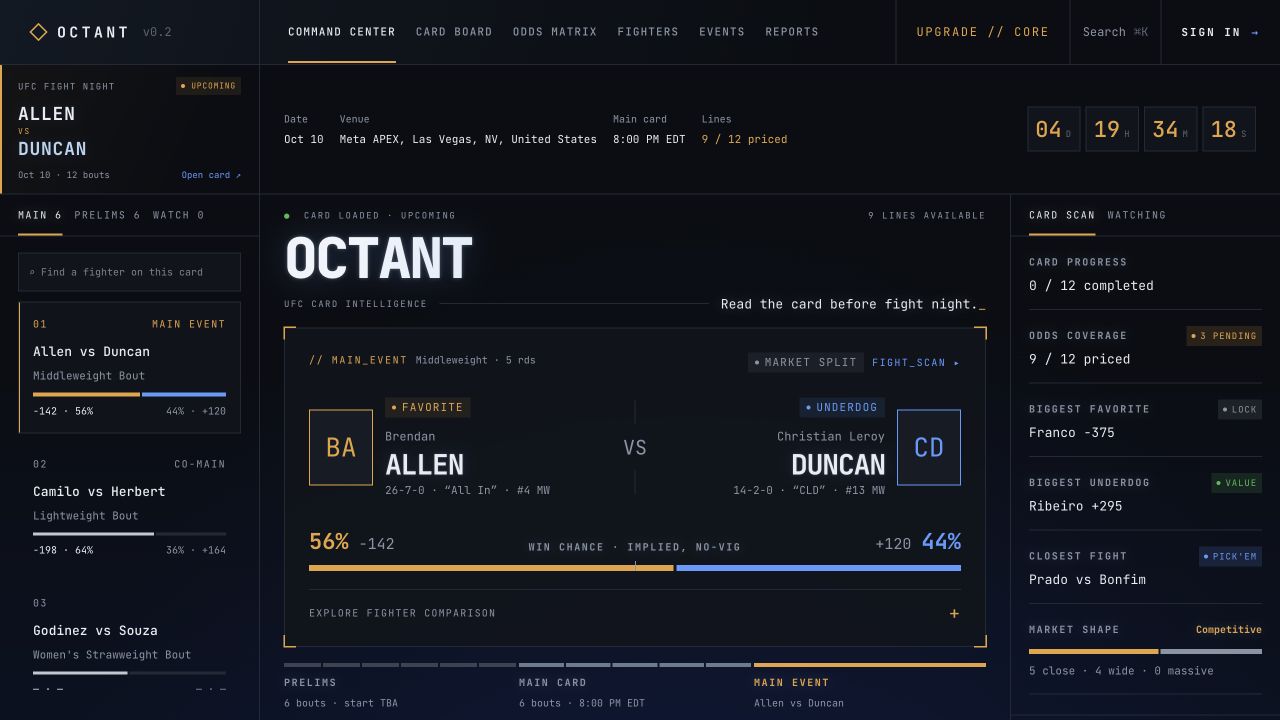
I designed and built Octant to bring UFC fight cards, odds and fighter research into one workspace. Fans can start with an event, compare its matchups and explore an individual fight.
My work connects the research pipeline to the dashboard and makes available, pending and missing information clear. Saved event reports let visitors return to the research after fight night.
The story
Octant brings UFC event cards, odds and fighter research into one connected workspace. I designed and built the product around moving from the whole card to an individual matchup, then returning to the research after fight night.
- 01PURPOSEBring fight cards, odds and matchup research into one place. jumpDESIGN
- 02WORKFLOWMove from an event overview to a focused fighter comparison. jumpDESIGN
- 03SYSTEMConnect collected fight data and prepared research to the dashboard. jumpFULL-STACK
- 04PRODUCTKeep published event research available after fight night. jumpFULL-STACK
The problem
Problem statement
Researching a UFC event means connecting the scheduled card, changing sportsbook prices, fighter records and matchup analysis. I wanted those inputs in one place, with clear signals for what is available, what is missing and which event the research belongs to.
User needs
- See the event card, fighter information and odds together.
- Know which fights have current prices and research available.
- Understand which event the research covers and where information is missing.
- Revisit completed-event research after the active fight card changes.
Architecture
The dashboard reads prepared data. Python collects card, odds and result records; n8n and analysis scripts process matchup inputs. The backend stores event-specific workbooks, JSON and report snapshots, and APIs supply the Next.js interface.
COLLECT
Cards + odds + results
PROCESS
Python + n8n
PUBLISH
Event files + snapshots
SERVE
Backend APIs
VIEW
Next.js dashboard
Bring research inputs together
Card details, fighter information, odds and prepared analysis feed one dashboard. This gives visitors a connected starting point for exploring an event and its matchups.
Organize research around the event
Each fight and its research belong to a specific card. The interface keeps that event context visible and shows when odds or analysis are still unavailable.
Keep a record after fight night
Saved reports let visitors revisit published research and settled results when the dashboard moves to the next event.
Workflow
The core user path in 5 steps.
Select
Open the active event or choose another card from the event index.
Scan
Compare matchups, card sections, fight status and available favorite and underdog prices.
Inspect
Open a fight to compare fighter records, recent results, win methods and available research.
Track
Use the watch list and odds views to keep selected matchups and their latest lines nearby.
Review
Return to event reports to revisit published research and settled results after fight night.
Interface
Screens with design decisions pinned beside them.
Make missing data visible
Unpriced markets, pending coverage and empty research states are part of the experience. They distinguish an incomplete feed from a completed analysis and avoid filling gaps with invented values.
Use progressive detail
The event overview supports a quick scan. Fight pages expose deeper comparisons; the command search connects major views without making every action compete for space in the main workspace.
Keep research and results distinct
Research panels prioritize published angles and show confidence. Reports track those published picks after settlement. Pending, unreviewed or unpriced picks prevent a final winning or losing verdict.
Build a consistent terminal language
Dark surfaces, fine borders, monospaced labels and amber emphasis connect navigation, data tables and matchup panels. Color supports market and status comparisons while text labels carry their meaning.
Stack
| LAYER | TOOL | WHY |
|---|---|---|
| Web app | Next.js 16 · React 19 · TypeScript | Typed event, fight, odds and report views using the App Router. |
| Presentation | Tailwind CSS 4 · custom CSS · GSAP | A consistent dense interface with shared styling and focused transitions. |
| Collection | Python · XLSX workbooks | Collects card, odds and results data, including historical price snapshots. |
| Analysis | n8n · Oracle · Style Clash | Processes matchup inputs and prepares research outputs before publication. |
| Storage | Event-specific files · JSON snapshots | Keeps research isolated by card and preserves reports across rollover. |
| Infrastructure | Vercel · Belfry runner | Separates web delivery from backend jobs and scheduled collection. |
| Access | Clerk · server authorization | Supports signed-in product tiers and protects operator update routes. |
Outcomes
- A live dashboard connecting event selection, card comparison, odds and fighter detail.
- Event research stays tied to the correct fight card as new data becomes available.
- Seven initial event reports, including research covering 13 fights on the UFC 332 card.
- Visitors can revisit published research and results for completed events when a new card becomes active.